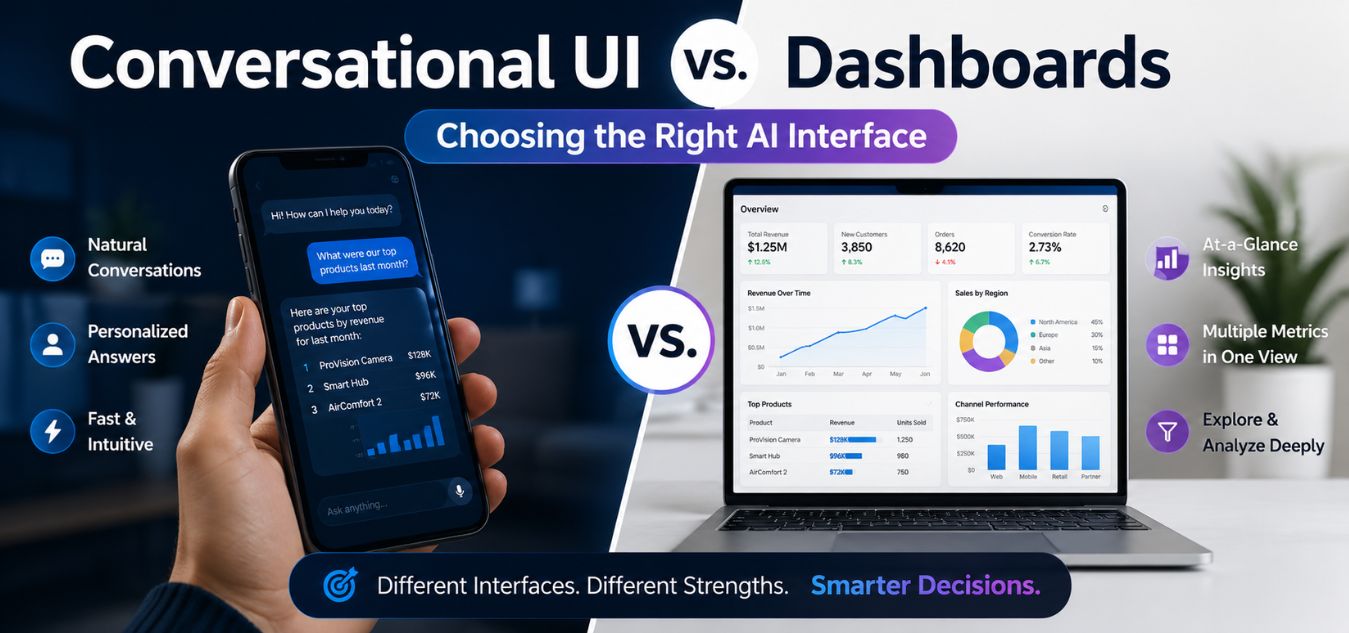
Conversational UI vs. Dashboards: Choosing the Right AI Interface
The Great AI Interface Dilemma
Generative AI has transformed what digital products can achieve, but building a powerful backend algorithm is only the first step. The biggest challenge product teams face today is figuring out how users should actually interact with that AI should they talk to it, or should they click it? Choosing the wrong interface can kill your user retention before you even launch, making this architectural decision critical to your product’s success.
The Core Options at a Glance:
| Interface Type | Primary Interaction | Best Suited For | Risk of Misuse |
| Conversational UI | Chat & Voice Prompts | Open-ended queries & creative ideation | The “blank canvas” freeze |
| AI Dashboard | Clicks & Visual Data | Structured tasks & rapid analytics | Visual clutter and data overload |
Why This Decision Matters:
Next Steps: Let’s break down Conversational UIs, traditional Dashboards, and when to use each for your AI product. Need an expert set of eyes right now? Explore our Custom UI/UX Design Services.
The Default Trap: Since the explosion of large language models (LLMs), the default answer for many companies has been to build a chatbot, but conversational interfaces are rarely a silver bullet.
The UX Reality: Forcing users to chat with an AI when they simply want to see their structured data is a massive, easily avoidable UX failure.
Expert Guidance: At Creative Riz, we have guided countless brands through this exact decision to ensure they build exactly what their users need.
Understanding Conversational UI (The Chatbot)

A Conversational UI allows users to interact with software using natural human language. This can be via text prompts or voice commands.
Instead of navigating through complex menus, the user simply tells the AI what they want to achieve. The system interprets the intent and generates an outcome.
When done correctly, this feels like magic. It drastically lowers the learning curve for non-technical users.
Pros of Conversational UI:
- Zero Onboarding: Users already know how to text. There are no complex navigation trees to memorize.
- Infinite Flexibility: A single text box can handle a million different commands, saving valuable screen real estate.
- Human-like Empathy: Tone and personality can be programmed into the responses, building emotional brand connection.
Cons of Conversational UI:
- Blank Canvas Syndrome: Users often freeze when faced with an empty prompt box, unsure of what the AI can do.
- Inefficient for Repetitive Tasks: Typing “Show me my daily sales report” every single morning is frustratingly slow.
- Memory Taxation: Users cannot easily see their past context unless they scroll endlessly through a chat log.
Are you building a conversational tool? See how we design intuitive chat experiences in our Digital Product Portfolio.
Understanding the AI-Powered Dashboard

A Dashboard UI is the traditional, visual approach to software design. It relies on buttons, charts, navigation bars, and data tables.
In the context of AI, a dashboard uses machine learning behind the scenes. It surfaces predictive analytics and personalized data without requiring the user to ask for it.
The AI acts as an invisible analyst, automatically organizing information in a way that makes sense visually.
Pros of Dashboard UI:
- High Information Density: Users can absorb a massive amount of data at a single glance.
- Discoverability: Visible buttons and menus clearly show the user exactly what the software is capable of doing.
- Speed of Execution: A single click is always faster than typing out a multi-sentence command.
Cons of Dashboard UI:
- Steep Learning Curve: Complex SaaS dashboards often require tutorials and onboarding sessions.
- Visual Clutter: If not designed carefully, throwing too much AI data onto a screen causes severe user anxiety.
- Rigidity: Users are limited to the exact workflows the designer explicitly built into the interface.
The UX Battle: Chat vs. Click
To make the right decision for your product, you must compare these interfaces across specific usability metrics.
Here is a side-by-side comparison to help your product team decide.
| Usability Metric | Conversational UI (Chat) | Dashboard UI (Click) |
|---|---|---|
| Speed for New Users | Incredibly fast (Natural language) | Slower (Requires exploring menus) |
| Speed for Power Users | Slower (Typing takes time) | Incredibly fast (Keyboard shortcuts & clicks) |
| Data Visualization | Poor (Text is bad at explaining trends) | Excellent (Charts, graphs, and tables) |
| Task Predictability | Variable (AI might hallucinate) | Deterministic (A button always does exactly one thing) |
| Mobile Experience | Excellent (Feels like a messaging app) | Challenging (Requires responsive stacking) |
Export to Sheets
This comparison clearly shows that neither interface is objectively “better.” The right choice depends entirely on your user’s specific context.
When to Choose a Conversational UI
You should lean toward a chat-based interface when your user’s goals are highly variable, exploratory, or creative.
If the user is coming to your platform to brainstorm, generate content, or ask complex questions, a conversational UI is the way to go.
Ideal Use Cases for Chat UIs:
- Creative Ideation: Writing marketing copy, brainstorming blog titles, or generating code snippets.
- Complex Troubleshooting: IT support or coding assistants where the user needs to explain a nuanced problem.
- Concierge Services: Travel planning or personal finance assistants where the AI needs to ask clarifying questions.
To succeed here, you must actively guide the user. Never just drop them into an empty chat window. Provide contextual prompt suggestions.
When to Choose a Dashboard UI
You should choose a dashboard when your user is performing repetitive tasks, analyzing data, or executing strict workflows.
If the user needs to quickly monitor the health of a system or compare metrics, forcing them to use a chatbot is a critical UX error.
Ideal Use Cases for Dashboard UIs:
- Financial Analytics: Tracking stock portfolios, crypto investments, or company revenue.
- E-commerce Management: Fulfilling orders, managing inventory, and tracking shipment statuses.
- Cybersecurity Monitoring: Instantly spotting server anomalies or active firewall breaches.
In these scenarios, the AI should be working invisibly to highlight the most urgent numbers in the dashboard. Need help organizing complex data? Schedule a UX Strategy Call.
The Ultimate Solution: The Hybrid “Co-Pilot” Model

For modern, enterprise-grade applications, the debate isn’t actually Chat vs. Dashboard. The future of product design is the Hybrid Model.
The Hybrid Model gives the user a robust, traditional dashboard for their daily tasks, paired with an AI “Co-pilot” that sits alongside the UI.
This approach offers the incredible data visualization of a dashboard with the infinite flexibility of a conversational AI.
How the Hybrid Model Works:
- The Main View: The user logs in and sees a beautiful Next.js rendered dashboard with their daily analytics.
- The Command Palette: The user hits
Cmd + Kto open a conversational search bar to ask the AI deep questions about the data they are viewing. - Context-Aware Chat: The AI reads the specific dashboard the user is currently on, so the user doesn’t have to explain their context.
Infographic Concept: The Interface Decision Tree
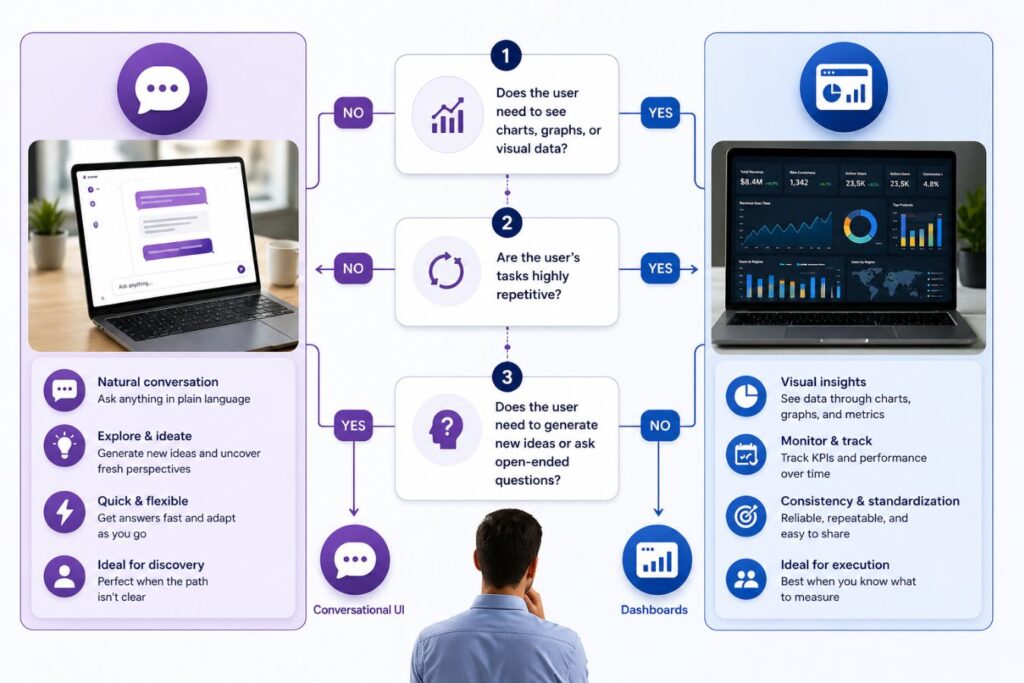
If your team is struggling to choose an interface, use this simple text-based decision tree to guide your architecture.
Question 1: Does the user need to see charts, graphs, or visual data?
- If Yes: Build a Dashboard.
- If No: Move to Question 2.
Question 2: Are the user’s tasks highly repetitive?
- If Yes: Build a Dashboard with smart buttons.
- If No: Move to Question 3.
Question 3: Does the user need to generate new ideas or ask open-ended questions?
- If Yes: Build a Conversational UI.
- If Both: Build a Hybrid Co-Pilot Interface.
Localization and Emerging Markets

When designing interfaces, you must consider the digital maturity and cultural context of your target audience.
For instance, when targeting the Pakistan market with digital awareness campaigns or local SaaS products, mobile-first design is absolutely critical.
In emerging markets, users often prefer highly visual dashboards with clear iconography over heavy, text-based conversational interfaces.
Localization Design Tips:
- Icon-Driven Navigation: Use universally understood symbols to overcome language barriers.
- WhatsApp Integrations: If using a conversational UI, integrate it into familiar platforms like WhatsApp rather than a custom web app.
- Bandwidth Considerations: Ensure your interface loads instantly on 3G and 4G mobile networks.
At Creative Riz, we specialize in designing products that resonate locally while competing globally. Explore our Branding and Localization Services.
Tech Stack Implications: Building for Speed
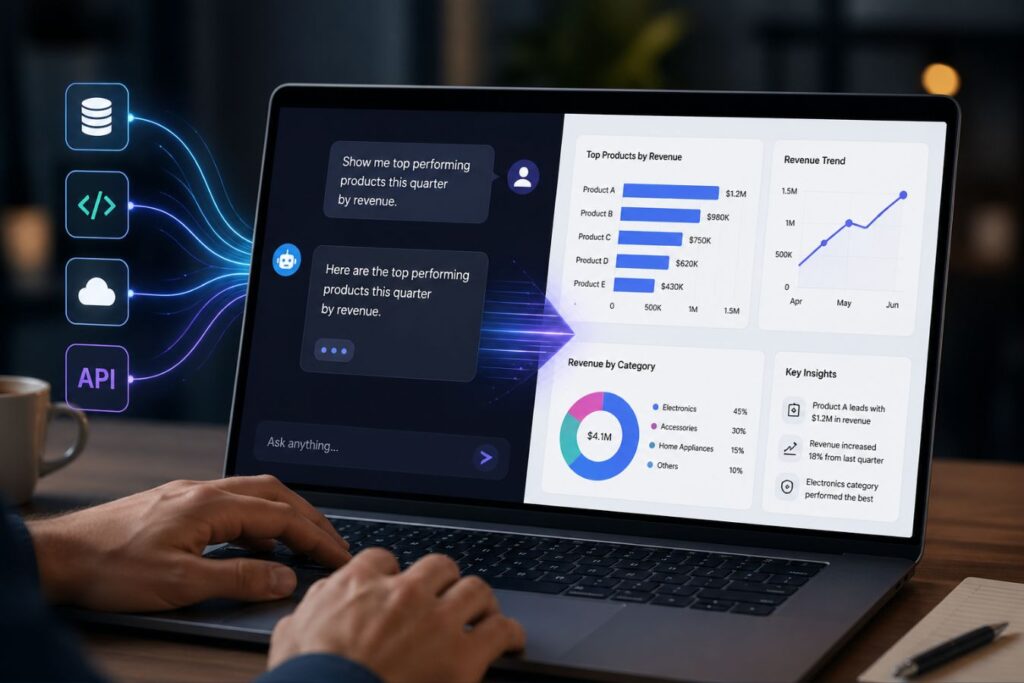
The interface you choose will heavily dictate your required tech stack. Generative AI applications demand serious processing power.
If you are building a Hybrid Co-Pilot, you need an architecture that can render visual dashboards instantly while maintaining an open WebSocket connection for real-time chat.
This is why we rely on modern JavaScript frameworks. Legacy builders simply cannot handle the latency requirements of a true AI product.
The Ideal AI Tech Stack:
- Frontend UI: Next.js and Tailwind CSS for lightning-fast server-side rendering and rapid prototyping.
- Backend Logic: Laravel or Node.js to securely process user data and communicate with external LLM APIs.
- State Management: React hooks to seamlessly manage the intersection between the visual dashboard data and the chat history.
Conclusion: Design for the Human, Not the Algorithm
The AI revolution is not an excuse to abandon the fundamental principles of user-centered design.
Whether you choose a conversational UI, a traditional dashboard, or a hybrid co-pilot, the goal remains the same: reduce friction.
Your users do not care how advanced your AI model is. They only care if your interface helps them solve their problem quickly and easily.
Stop forcing your users to adapt to your technology. Design an interface that adapts to them.
Are you ready to build an AI product that users actually love? Reach out to Creative Riz today, and let’s turn your algorithm into an intuitive, market-leading experience.
Frequently Asked Questions (FAQs)
What is “Blank Canvas Syndrome” in Conversational UIs?
Blank canvas syndrome happens when a user is faced with an empty text box and no instructions. Because they don’t know the AI’s limitations or capabilities, they freeze and abandon the app. You can fix this by providing clickable “prompt suggestions” right above the chat bar.
Is a Dashboard UI better for mobile apps?
It depends on the complexity. Simple conversational UIs (like standard messaging apps) are incredibly native to mobile. However, complex dashboards with multiple data tables are notoriously difficult to design for small screens and often require a desktop environment to be truly useful.
How hard is it to build a Hybrid Co-Pilot interface?
Building a hybrid UI is technically challenging because it requires bridging a traditional database with a generative LLM. You must use modern frameworks like Next.js to ensure the interface doesn’t lag while the AI is “thinking,” and you need strict API security to protect your backend data.
About the Author