
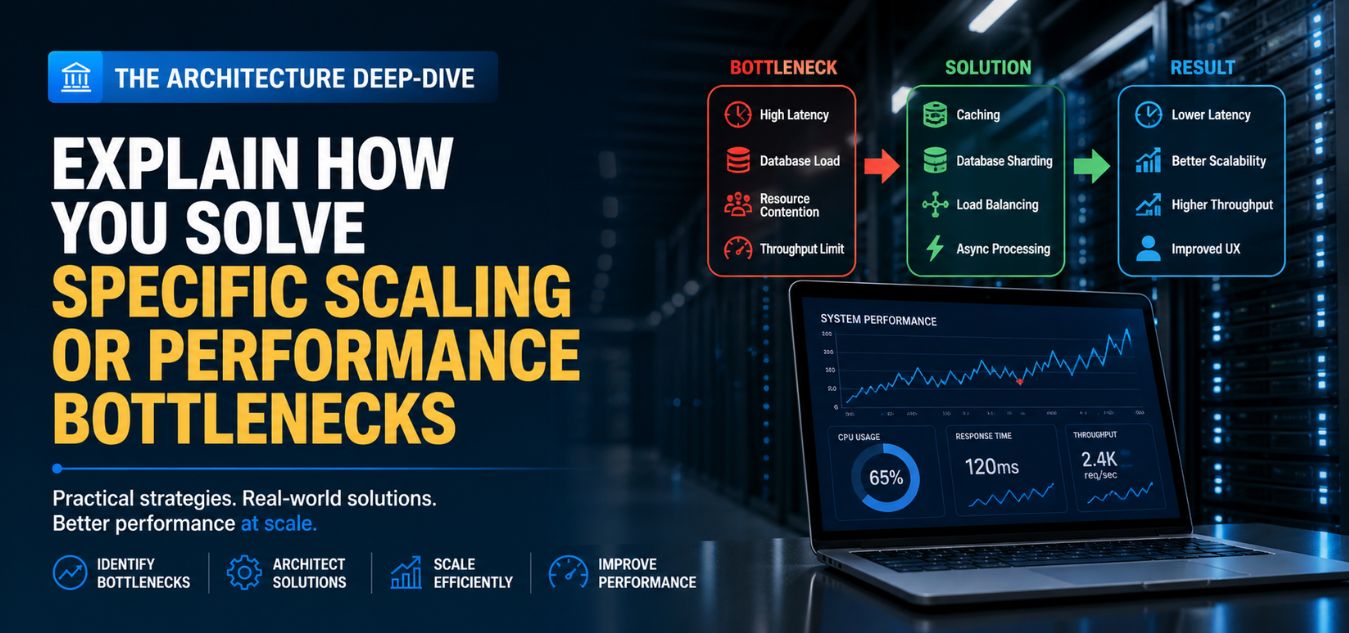
The Architecture Deep-Dive: Explain How You Solve Specific Scaling or Performance Bottlenecks
The Scalability Trap: Why Beautiful Applications Fail Under Pressure
A stunning user interface is completely useless if your underlying system crashes when it matters most. While early-stage startups often rush features to secure funding, those initial architectural shortcuts inevitably become massive liabilities as user adoption grows.
In the modern digital economy, performance is not just an isolated technical metric it is the absolute foundation of user trust and retention.
Today, we are taking a deep dive into the engineering architecture that separates amateur applications from enterprise-grade platforms.
Here is exactly what happens when architectural debt meets a surge in traffic:
- The Compounding Effect: Minor code inefficiencies multiply rapidly, causing databases to lock up the moment thousands of users hit your servers simultaneously.
- The PR Nightmare: Agonizingly slow page loads turn highly anticipated product launches into brand-damaging events that drive users to competitors.
- The Enterprise Difference: Scalable systems proactively hunt down bottlenecks before they happen, ensuring a frictionless experience regardless of the server load.
To understand why proactive engineering is essential, look at how the approach to development changes as a product scales:
| The Growth Phase | The Technical Reality | The Direct Business Impact |
| Early-Stage Build | Rushed feature development with unoptimized database queries. | Accumulates heavy technical debt that threatens future scalability. |
| The Traffic Surge | Servers buckle under pressure, causing multi-second load times. | Shatters user momentum, leading to abandoned carts and lost revenue. |
| Enterprise Architecture | Code is engineered for resilience, eager loading, and smart caching. | Delivers flawless performance that converts users and secures brand equity. |
By the end of this guide, you will understand exactly how to solve these common bottlenecks and build resilient systems capable of handling exponential growth.
The Illusion of “It Works on My Machine”
The biggest trap in software development is the disconnect between local testing environments and production servers.
When a developer builds a feature locally, they are usually the only person querying the database. Under those isolated conditions, a poorly written database query will still execute in milliseconds.
The real test of architecture occurs when a marketing campaign sends ten thousand simultaneous users to your platform.
That is when the cracks in the foundation begin to show, and server CPU usage spikes to 100%. To survive this surge, your engineering team must proactively hunt for bottlenecks long before the traffic arrives.
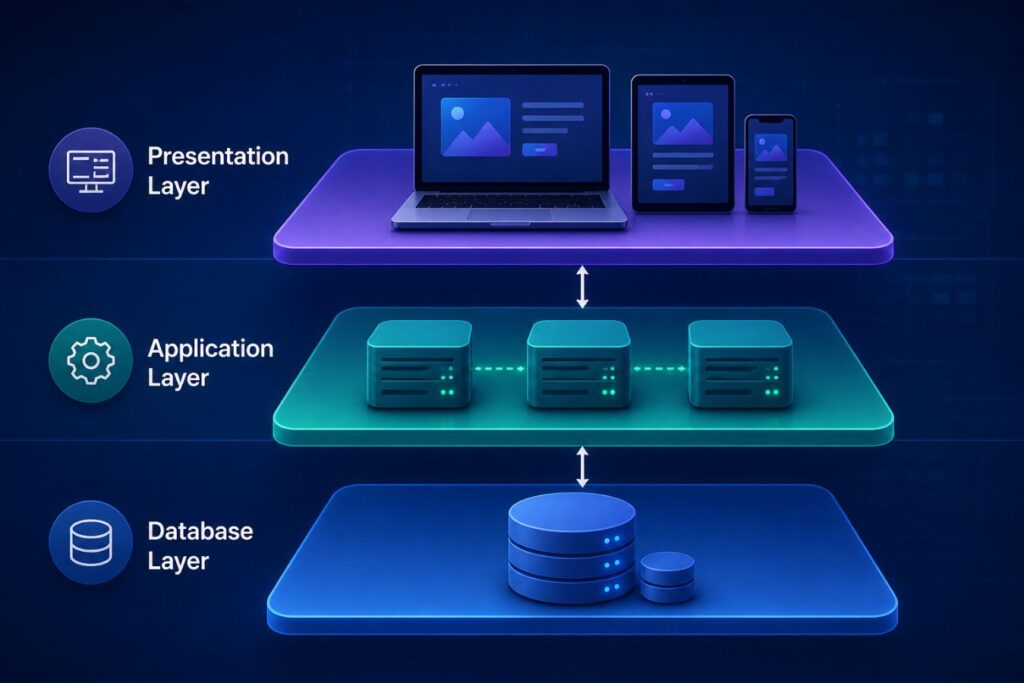
The 3 Layers of Application Scaling
- The Database Layer: Eliminating redundant queries, building correct indexes, and optimizing data retrieval.
- The Application Layer: Trimming API payloads, writing efficient server-side logic, and utilizing caching.
- The Presentation Layer: Delivering optimized visual assets and rendering the user interface asynchronously.
The Silent Killer: Database N+1 Queries

If your web application suddenly grinds to a halt under pressure, your database is almost always the culprit. While modern frameworks make fetching related data incredibly easy, this convenience often hides a massive architectural flaw: the N+1 query problem.
This invisible bottleneck silently drains your server’s resources, turning a minor spike in traffic into a complete system crash.
To understand how destructive this is, imagine a backend admin portal designed to display 50 university students and their assigned laptops.
- The Flaw (N+1): An unoptimized system executes one query to fetch the 50 students, but then executes 50 additional, separate queries to fetch the laptop data for each individual.
- The Snowball Effect: This means the database is hammered with 51 queries for just a single page load.
- The Meltdown: If 1,000 admins log in simultaneously, that one page generates 51,000 simultaneous database queries, instantly overwhelming and crashing the server.
The solution is an architectural technique called “Eager Loading,” which fundamentally changes how your server communicates with your database.
| Database Strategy | The Mechanism | Queries for 50 Items | Performance Impact |
| Lazy Loading (The Flaw) | Fetches the primary data, then loops through to fetch relations one by one. | 51 Queries (N+1) | High risk of server crashes; slow, multi-second page loads. |
| Eager Loading (The Fix) | Instructs the server to fetch all primary data and all related data in bulk. | Exactly 2 Queries | Ultra-lean server load; instantaneous, millisecond page renders. |
By re-engineering the data retrieval process, the results are immediate and highly measurable:
- The Engineering Fix: We instruct the server to fetch all students, and then fetch all associated laptops in just one secondary bulk query.
- The Technical Result: The database executes exactly 2 queries instead of 51, regardless of whether there are 50 students or 5,000 on the page.
- The Business Impact: Server load drops dramatically, bandwidth is preserved, and the user experiences a lightning-fast, frictionless interface.
Optimizing API Payloads for Speed

A bloated API response is the silent thief of digital speed, particularly for users on mobile networks. When developers mistakenly return massive, deeply nested JSON objects to a frontend that only requires a fraction of that data, the entire application chokes. To engineer a lightning-fast, scalable architecture, you must relentlessly strip away every byte of unnecessary information before the server ever transmits the response.
Here is why ruthless payload optimization is non-negotiable for enterprise-grade applications:
- The Bandwidth Drain: Sending unused database IDs, creation timestamps, and redundant metadata wastes critical bandwidth and client-side processing power.
- The Mobile Penalty: Heavy payloads exponentially degrade the user experience for customers on slower 3G/4G or unstable network connections.
- The Multiplier Effect: A seemingly harmless wasted 100KB per request transforms into a catastrophic bottleneck when multiplied by thousands of concurrent user logins.
Visualizing the Fix: The Authentication Bottleneck
Consider how user roles and security clearances are handled during a standard login sequence. Returning an array of objects containing database IDs, timestamps, and names is incredibly wasteful.
Here is a visual breakdown of how a minor architectural tweak fundamentally changes server load:
Plaintext
[ ❌ The Bloated Architecture ] Server Response: { "user": { "id": 9048, "last_login": "2026-05-04T08:00:00Z", "permissions": [ { "id": 12, "name": "view_dashboard", "created_at": "..." }, { "id": 15, "name": "edit_records", "created_at": "..." } ] } } └─ Result: High latency, wasted bandwidth, slow UI rendering. ⬇️ Strategic Refactoring ⬇️ [ ✅ The Precision Architecture ] Server Response: { "permissions": ["view_dashboard", "edit_records"] } └─ Result: Maximum efficiency, instant parsing, effortless scalability. The Architectural Shift
To engineer a highly optimized platform, simplify the data structure entirely. As shown above, the permissions key in your login API response should return the assigned permissions as a simple array of names, stripping out the IDs entirely.
| Architectural Aspect | The Bloated Approach (The Problem) | The Precision Approach (The Solution) |
| Data Structure | Deeply nested JSON objects. | Flat, simplified arrays of strings. |
| Data Sent | Everything (IDs, timestamps, database metadata). | Only the exact values required by the frontend UI. |
| Payload Weight | Massive (often 100KB+ per request). | Microscopic (often under 5KB per request). |
| Scalability Impact | Server network interfaces bottleneck under heavy traffic. | Scales effortlessly, saving massive amounts of bandwidth. |
Implementing Strategic Server-Side Caching

Every time a user visits your platform, your server expends energy calculating data and rendering HTML. If the data on that page hasn’t changed, repeating those calculations over and over is a massive waste of resources.
Strategic caching is the ultimate secret weapon for scaling a web application efficiently. Caching involves storing the results of expensive database queries or API calls in temporary, high-speed memory.
When the next user requests the same information, the server hands them the cached copy instantly. This entirely bypasses the slow database, allowing your application to handle traffic spikes effortlessly.
- In-Memory Caching (Redis): We utilize Redis to store frequently accessed data, like user session states or complex dashboard analytics.
- Edge Caching (CDN): We push static assets (images, stylesheets, fonts) to Content Delivery Networks distributed globally, so a user in London downloads images from a London server, not yours.
- Query Caching: We cache the exact results of heavy, complex database calculations that only need to be updated once an hour.
Comparing the Architectures
To fully understand the ROI of optimized engineering, let’s look at the numbers. This table illustrates the stark difference between an unoptimized startup architecture and a professionally scaled platform.
Technical optimization directly translates to a superior user experience and lower server hosting costs.
| Metric | Unoptimized Architecture | Scaled & Optimized Architecture |
| Database Queries per page | 50+ (Suffering from N+1 issues) | 2 to 3 (Utilizing strict eager loading) |
| API Payload Size | 150kb (Nested, bloated JSON data) | 12kb (Flattened, strictly necessary data) |
| Server Response Time | 2.5 seconds | Under 200 milliseconds |
| Infrastructure Cost | High (Requires massive servers to handle poor code) | Low (Efficient code runs smoothly on lean servers) |
| User Experience | Frustrating, lagging, high bounce rates | Frictionless, instant, highly engaging |
Case Study: Scaling a High-Volume Admin Portal
Theory and best practices must be validated by real-world execution. We recently engineered the backend architecture for a massive government-level student portal managing thousands of hardware allocations.
The platform required complex hierarchical roles, spanning from basic data entry clerks to Super Admin directors. The initial prototype built by a previous vendor was buckling under the weight of its own data.
Simply loading the main analytics dashboard took upwards of ten seconds, creating a massive bottleneck for the administrative staff.
We were brought in to completely tear down and rebuild the data access layer.
- What We Did: We eliminated every N+1 query, rewrote the API to deliver flattened payloads, and implemented Redis caching for the dashboard statistics.
- The Result: Page load times dropped from ten seconds to roughly 150 milliseconds.
- The Lesson: You cannot solve bad architecture by simply throwing more money at expensive server hardware.
Frontend-Backend Synergy: The Decoupled Approach

Scaling an enterprise platform is not just about turbocharging your database. It is fundamentally about how intelligently your frontend and backend systems communicate with each other.
Traditional web applications tightly coupled server logic with HTML rendering, creating a rigid structure. When these systems are locked together, a slow database query creates a massive bottleneck.
The user is forced to stare at a frustrating, blank white screen until the server finishes thinking. Modern, high-performance architecture solves this by entirely decoupling the frontend from the backend.
The Real-World Mental Model: The High-End Restaurant
Imagine a traditional restaurant where the head chef (the Backend) is also forced to walk out and set the tables (the Frontend). If the food takes too long to cook, the dining room stays empty and guests leave.
In a Decoupled Architecture, you have dedicated waitstaff (Frontend) who immediately seat guests, hand out menus, and serve drinks instantly. Meanwhile, the kitchen (Headless Backend) focuses purely on preparing the main course (Raw Data). The customer is entertained and engaged the entire time.
By splitting these responsibilities, we unlock massive technical advantages:
- The Headless Backend: The server operates purely as a secure API, focusing exclusively on processing complex logic and delivering raw data efficiently.
- The Autonomous Frontend: Utilizing modern frameworks like Next.js and React, the user interface operates independently, loading instantly and fetching data asynchronously.
- Independent Scalability: If a massive influx of users strains your API, we can allocate more server power directly to the backend without ever touching or disrupting the frontend codebase.
To visualize the immediate business impact of this engineering choice, compare the two approaches:
| Architecture Model | System Mechanics | The User Experience | Scaling Capabilities |
| Coupled (Legacy) | Server processes heavy logic and builds the HTML layout simultaneously. | High friction; the screen remains blank until all background processes completely finish. | Rigid; you must scale the entire heavy system even if only the database is stressed. |
| Decoupled (Modern) | Backend API securely delivers lightweight, raw data to an independent frontend. | Frictionless; beautiful UI loads instantly and populates with data smoothly in real-time. | Agile; precise, independent server scaling for the exact component that requires more power. |
This seamless synergy is the technical foundation of every major global platform today. It requires deep expertise in both visual rendering and robust backend logic to execute flawlessly.
Designing to Mask Latency

Even with the most perfectly optimized architecture in the world, some processes simply take time. Processing a large video upload, running a complex AI algorithm, or generating a massive PDF report cannot happen in zero seconds.
When engineering hits a physical limit, intelligent UI/UX design must step in to bridge the gap. Design can fundamentally alter a user’s perception of time.
If a user clicks a button and nothing happens for three seconds, they will assume the site is broken and leave.
If they click a button and immediately see a beautiful, animated progress state, they will happily wait.
- Skeleton Screens: Instead of a blank page, we load a gray, pulsing outline of the content layout while the real data fetches in the background.
- Optimistic UI: When a user “likes” a post, we instantly turn the button blue on the screen, assuming the server will succeed, rather than making them wait for the official server response.
- Engaging Micro-Interactions: We utilize our 2D animation expertise to create delightful loading sequences that distract and entertain the user during heavy data processing.
Background Jobs and Queueing Systems

One of the fastest ways to crash a web server is to force the user to wait for a heavy task to finish. Imagine a platform where a user uploads a massive CSV file containing 10,000 customer records.
If the server tries to process all 10,000 rows while the user’s browser is actively waiting, the connection will time out. The architectural solution to this bottleneck is implementing an asynchronous queueing system.
Instead of processing the file immediately, the server quickly accepts the file, says “Thank You,” and hands the task to a background worker.
The background worker chugs through the 10,000 rows independently, completely invisible to the end user.
- The user experiences an instantaneous response from the web page.
- The server’s main thread remains completely free to handle traffic from other users.
- Once the background job is complete, the system sends an automated email or a real-time web notification to the user.
The Role of Automated Load Testing

You should never wait for your users to discover your platform’s breaking point. Professional engineering teams utilize automated load testing to simulate massive traffic spikes in a safe staging environment.
We use specialized software to blast our APIs with thousands of concurrent virtual users to see exactly where the architecture fails.
This stress testing reveals the hidden bottlenecks that are impossible to spot during casual development. It might expose a database query that locks up under pressure, or a memory leak in a specific API route.
By breaking the application intentionally, we can engineer the fixes before the code ever reaches production.
Real-World Examples:
- A login API that responds in 200ms during testing may slow down to 5–8 seconds when hit with 10,000 concurrent requests due to unoptimized database indexing.
- A payment processing endpoint might fail intermittently under load because of session locking issues in the database transaction layer.
- A report generation feature could crash entirely when multiple users request large datasets at the same time due to insufficient memory allocation.
By intentionally breaking the application in a safe environment, we gain the opportunity to engineer reliable fixes before the code ever reaches production. This ensures stability, scalability, and a seamless user experience even during peak traffic conditions.
Sustaining a High-Performance Culture
Architectural excellence is not a destination; it is a continuous, evolving culture within a development team. As your business grows and your features become more complex, new performance challenges will constantly arise.
Maintaining a fast, scalable platform requires a commitment to writing clean, disciplined code every single day.
When your platform is engineered for scale, you remove the technical ceiling on your company’s growth. Your marketing team can confidently launch massive campaigns without fearing a server crash.
Your users will reward your speed and reliability with long-term loyalty and higher conversion rates. If your current web application is struggling to keep up with your business growth, we are here to help.
Our multidisciplinary agency specializes in tearing down technical bottlenecks and building scalable, enterprise-grade architecture.
Frequently Asked Questions (FAQs)
1. How do I know if my website is suffering from the N+1 query problem?
The most common symptom is an application that runs fast when there are only a few items on a page, but slows to a crawl when you display a large list. You can also install developer debugging tools (like Laravel Telescope) that explicitly count the number of database queries executing per page load.
2. Is it better to upgrade to a larger server or optimize my application’s code?
2. Is it better to upgrade to a larger server or optimize my application’s code?
Optimizing your code is always the superior, more sustainable long-term strategy. Upgrading a server to mask poorly written code is incredibly expensive and only delays the inevitable crash. Clean architecture allows a massive platform to run efficiently on surprisingly lean, cost-effective server infrastructure.
3. What is the difference between an API payload and database optimization?
Database optimization ensures the server retrieves data from the hard drive as fast as possible. API payload optimization ensures the server only sends the strictly necessary data back to the user’s browser. Both must be optimized simultaneously; fetching data quickly is useless if you then try to force a massive, bloated file through a slow mobile network.
About the Author